Black Friday Cyber Scams: What Small Businesses Should Watch Out for in 2026
Black Friday is one of the busiest shopping periods of the year, bringing increased online sales, promotional campaigns, vendor transactions, and customer activity. But while businesses prepare for seasonal demand, cybercriminals are preparing to exploit the same opportunities.
In 2026, Black Friday cyber scams are becoming increasingly sophisticated. Phishing emails can imitate trusted suppliers, fraudulent invoices can look like legitimate business expenses, and fake delivery notifications can trick employees into revealing sensitive information. With artificial intelligence making it easier to create convincing messages and impersonate trusted contacts, identifying suspicious activity is becoming more challenging.
For small businesses in Mountain View, Silicon Valley, Long Beach, and across California, these threats can have consequences beyond a single fraudulent transaction. A compromised employee account could expose customer information, disrupt operations, or provide attackers with access to the company's wider IT infrastructure.
So, what cyber scams should small businesses watch out for this Black Friday, and how can they protect their business?
Let's look at the most common threats and the cybersecurity measures that can help reduce the risk.
Why Does Black Friday Increase Cybersecurity Risks for Small Businesses?
The holiday shopping season creates a high-pressure business environment. Employees process more orders, respond to promotional emails, coordinate with suppliers, manage customer inquiries, and handle increased payment activity.
Cybercriminals take advantage of these conditions.
According to Darktrace's November 24, 2026 findings, businesses experienced approximately 13 times as many Black Friday-themed phishing emails per day during the first three weeks of November compared with October. Its analysis also found particularly sharp increases among businesses in the United States and Canada.
Check Point Research also reported a 28% increase in cyberattacks against consumer goods and services organizations ahead of Black Friday 2026 compared with its earlier baseline.
These findings highlight an important point: seasonal cyber threats are not limited to large retailers. Small businesses, vendors, service providers, and organizations handling customer or payment information can also become targets.
A single successful attack may result in financial losses, unauthorized account access, stolen business information, or operational downtime.
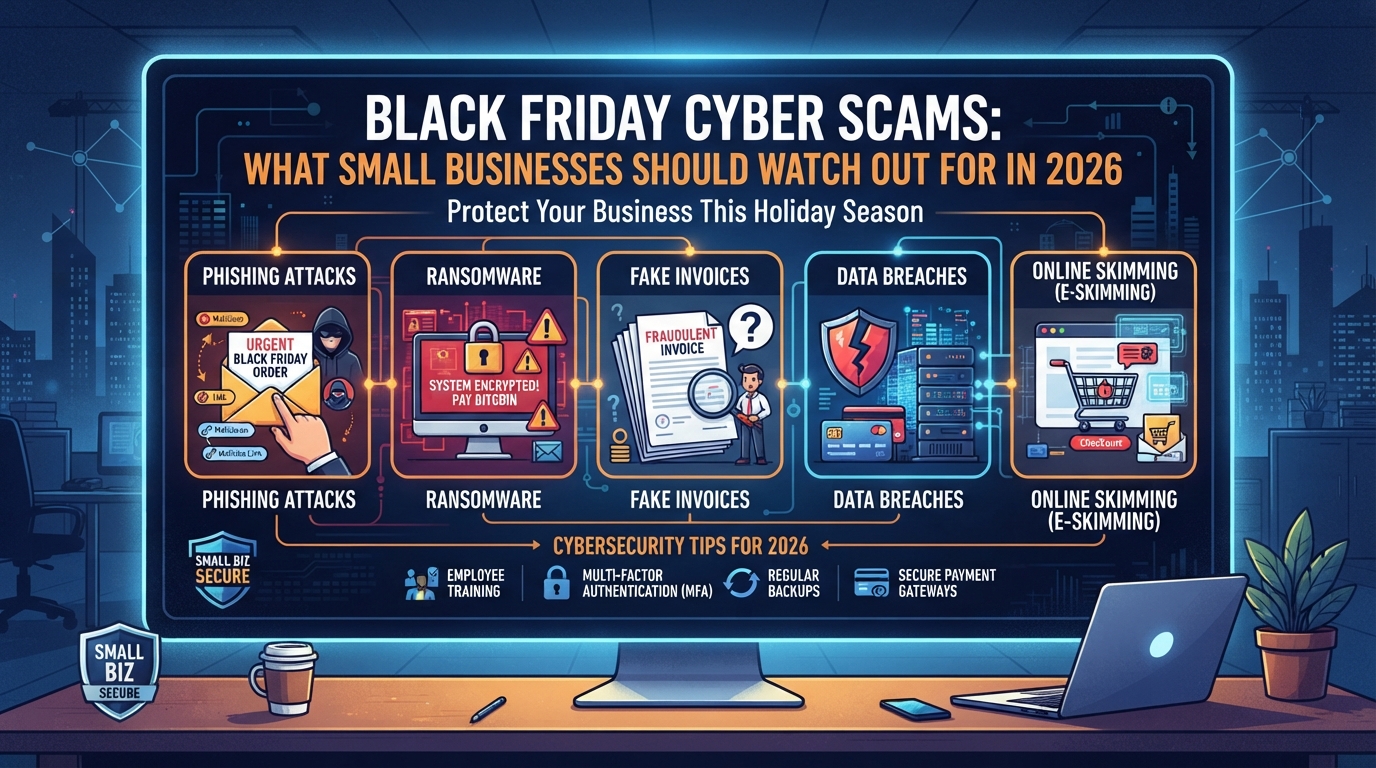
7 Black Friday Cyber Scams Small Businesses Should Watch Out for in 2026
1. Phishing Emails Disguised as Black Friday Deals
Phishing remains one of the most common ways cybercriminals gain access to business accounts.
During Black Friday, employees may receive emails advertising discounted software subscriptions, office equipment, business tools, or exclusive vendor promotions. These messages may imitate recognizable brands and encourage recipients to click a link to claim a limited-time offer.
However, the link may lead to a fraudulent website designed to collect login credentials, payment information, or other sensitive business data.
Common warning signs include:
Unsolicited promotional emails with unusually large discounts.
Links directing employees to unfamiliar websites.
Unexpected attachments or downloadable files.
Urgent messages claiming an offer expires within minutes.
Requests to sign in using company email credentials.
How to protect your business:
Avoid accessing business accounts through unsolicited promotional links. Visit the vendor's official website directly, verify the sender's email address, and use multi-factor authentication (MFA) to add another layer of account protection.
Employees should also know how to report suspicious emails instead of simply deleting or forwarding them.
2. Fake Invoices and Vendor Payment Scams
Black Friday and the year-end period often involve increased purchasing activity. Businesses may order inventory, upgrade equipment, renew software subscriptions, or pay suppliers before the holiday break.
Scammers exploit these transactions by sending fraudulent invoices that resemble legitimate vendor communications.
Some attacks involve impersonating an existing supplier and claiming their banking information has changed. Others involve creating fake invoices for products or services the business never ordered.
This is particularly dangerous for small businesses where one employee may handle purchasing, invoice approvals, and payments.
Watch out for:
Unexpected invoices from unfamiliar suppliers.
Last-minute requests to update banking details.
Payment instructions that differ from previous transactions.
Pressure to process transfers immediately.
Slightly altered vendor email addresses.
How to protect your business:
Establish a clear invoice approval process. Match invoices against purchase orders and confirm any changes to payment instructions by calling the supplier using a previously verified phone number.
Never rely solely on the contact information included in an unexpected payment request.
3. Fake Shipping and Delivery Notifications
Businesses frequently receive deliveries during the holiday season, including inventory, office supplies, equipment, and customer orders.
Cybercriminals take advantage of this activity by sending fake notifications that appear to come from delivery companies such as UPS, FedEx, or USPS.
These messages may claim that a package is delayed, an address needs verification, or an additional delivery fee must be paid.
Clicking the link can take employees to a fraudulent tracking page that requests personal information, login credentials, or payment details. In some cases, the link may also expose the device to malicious software.
How to protect your business:
Track packages through the delivery provider's official website or application. Avoid clicking unexpected tracking links, and verify delivery problems directly with the supplier or shipping company.
Employees responsible for receiving inventory should be particularly cautious of unexpected delivery-related messages.
4. Business Email Compromise and Executive Impersonation
Business Email Compromise (BEC) is a type of cybercrime in which attackers impersonate executives, employees, or trusted business partners to manipulate someone into transferring money or sharing confidential information.
For example, an employee might receive an urgent email that appears to come from the business owner requesting an immediate vendor payment. Another message might ask the accounting department to purchase gift cards for holiday rewards.
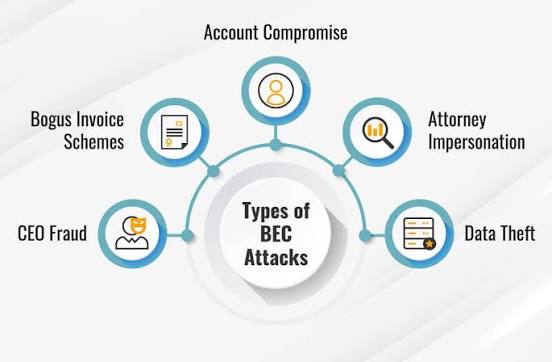
These attacks can become especially convincing when criminals gain access to an existing email account or study previous business conversations.
AI-generated messages can also make impersonation attempts more polished and believable.
How to protect your business:
Verify unusual financial requests through a separate communication channel.
Require additional approval for large or unexpected transactions.
Use MFA for business email accounts.
Restrict access to financial and administrative accounts.
Train employees to recognize impersonation attempts.
A familiar name or email signature should never be treated as sufficient proof that a payment request is legitimate.
5. Fake Social Media Account Warnings and Business Page Scams
Social media platforms are important marketing and communication channels for many small businesses. Unfortunately, cybercriminals also use them to target business owners and marketing teams.
A fraudulent message may claim that a company's Facebook or Instagram business account has violated platform policies, is about to be suspended, or requires immediate verification.
The message typically includes a link to a fake appeal or login page. Once an employee enters their credentials, attackers may gain control of the business account.
Losing access can disrupt advertising campaigns, damage customer trust, and allow scammers to publish fraudulent content under the company's name.
How to protect your business:
Enable two-factor authentication on all business social media accounts.
Limit administrative access to trusted employees.
Review account permissions regularly.
Check platform notifications by logging in directly.
Never submit login credentials through unexpected account-warning links.
Marketing teams should receive cybersecurity awareness training just like employees working in finance or IT.
6. Fake Software Updates and Black Friday Tech Discounts
Black Friday promotions often include attractive discounts on laptops, productivity software, cybersecurity subscriptions, and other business technology.
Scammers may advertise fake software licenses, counterfeit security tools, or heavily discounted business applications through fraudulent websites.
Another tactic involves sending fake software update notifications that encourage employees to download malicious files.
Installing an unverified application can expose business devices to malware, credential theft, or unauthorized access.
How to protect your business:
Purchase software and equipment from verified vendors. Download applications and updates directly from official websites or trusted app stores.
Businesses should also maintain an inventory of approved software and ensure operating systems, applications, and security tools receive legitimate updates.
If your organization is planning technology upgrades this Black Friday, verify the seller and licensing terms before making a purchase.
7. Ransomware Attacks During the Holiday Rush
Ransomware is one of the most disruptive cybersecurity threats facing businesses.
In a ransomware attack, malicious software can encrypt business files and systems, preventing employees from accessing important information. Attackers may then demand payment in exchange for restoring access or preventing the release of stolen data.
For small businesses, the consequences can include interrupted sales, inaccessible customer records, delayed services, and costly recovery efforts.
The holiday period can make these attacks particularly damaging because businesses may have fewer employees available to respond to an incident.
How to protect your business:
Maintain regular, tested backups of critical business data.
Keep operating systems and applications updated.
Use endpoint protection and network monitoring.
Restrict employee access according to job responsibilities.
Secure remote access with MFA.
Develop and test an incident response and recovery plan.
Backups should be protected from unauthorized access and stored separately from the systems they are intended to restore.
How Can Small Businesses Protect Their IT Infrastructure This Black Friday?
Recognizing cyber scams is important, but businesses also need preventive security measures that reduce the likelihood and impact of an attack.
Here are six practical steps to strengthen your cybersecurity before the holiday rush.
1. Enable Multi-Factor Authentication Across Business Accounts
Passwords alone are not always enough to protect company accounts. MFA requires an additional verification step, making it harder for unauthorized users to access accounts even if a password is compromised.
Prioritize business email, cloud applications, financial platforms, remote access, and administrator accounts.
2. Update Devices, Applications, and Security Software
Outdated software may contain security vulnerabilities that attackers can exploit.
Before Black Friday, check that company computers, servers, routers, applications, and security tools are receiving supported updates.
Remove software that is no longer needed and review devices that may have been overlooked.
3. Train Employees to Recognize Seasonal Scams
Employees are often the first people to encounter phishing emails, suspicious invoices, and fraudulent account notifications.
Provide short, practical cybersecurity training covering:
Identifying suspicious email addresses and links.
Verifying unexpected payment requests.
Recognizing fake login pages.
Reporting suspicious messages.
Handling sensitive customer and business information.
A clear reporting process helps employees raise concerns before a potential incident becomes a larger problem.
4. Back Up Critical Business Data
A reliable backup strategy helps businesses recover from ransomware, accidental deletion, hardware failure, and other disruptions.
Follow the 3-2-1 backup approach:
Keep three copies of important data.
Store them on two different types of media.
Maintain one copy off-site or otherwise isolated from the primary network.
Test backups regularly to confirm that files and systems can actually be restored.
5. Secure Your Business Network and Remote Access
Small businesses often rely on connected devices, cloud applications, wireless networks, and remote employees.
Review network access, secure Wi-Fi connections, replace default router credentials, and restrict remote access to authorized users.
For businesses operating across multiple locations or supporting hybrid teams, centralized monitoring can help identify unusual activity and potential security issues.
6. Have an IT Support and Incident Response Plan
Knowing who to contact during a cyber incident can make a significant difference in limiting its impact.
Your business should have a clear process for reporting suspicious activity, isolating affected devices, contacting IT support, and recovering critical systems.
Proactive IT monitoring and managed cybersecurity services can help identify potential issues before they develop into serious disruptions.
What Should You Do If Your Business Falls Victim to a Black Friday Cyber Scam?
Even businesses with security measures in place can experience cyber incidents. The important thing is to respond quickly and avoid making the situation worse.
If you suspect a scam or compromised account:
Disconnect affected devices: If malware or ransomware is suspected, isolate affected devices from the network. Avoid shutting down or modifying systems unnecessarily if forensic investigation may be required.
Contact your IT support provider: Have qualified IT professionals investigate the incident, identify affected accounts or devices, and contain the threat.
Secure compromised accounts: Change affected passwords from a trusted device, revoke suspicious sessions, and enable MFA.
Contact your financial institution: If money has been transferred or payment details have been compromised, notify your bank immediately and request assistance with stopping or recovering the transaction.
Preserve evidence: Keep suspicious emails, transaction records, screenshots, and relevant system logs for investigation.
Assess the exposure: Determine whether customer information, employee records, or other sensitive business data may have been accessed.
Report the incident: In the United States, report suspected online crime to the FBI's Internet Crime Complaint Center (IC3). Business fraud can also be reported to the Federal Trade Commission (FTC).
If personal information may have been exposed, consult appropriate legal and compliance professionals to determine applicable notification obligations.
Why Small Businesses in Mountain View and Long Beach Need Proactive Cybersecurity
Businesses throughout Silicon Valley and the greater Bay Area rely on technology to manage customer relationships, process transactions, communicate with vendors, and maintain daily operations.
From professional service providers in Mountain View to growing businesses in Long Beach, California, a cybersecurity incident can interrupt essential operations regardless of company size.
Small businesses may not have dedicated internal IT security teams to monitor threats around the clock. This can make it difficult to identify suspicious activity, maintain security updates, manage employee access, and respond quickly when something goes wrong.
A proactive approach to IT management helps close these gaps.
Working with a managed IT and cybersecurity provider can help businesses maintain secure networks, monitor systems, manage updates, strengthen account protection, and prepare for potential incidents.
For businesses that depend on uninterrupted access to their technology, cybersecurity should be part of everyday operations rather than something addressed only after an attack.
Protect Your Business Before the Holiday Rush
Black Friday should be an opportunity to grow your business, not an opportunity for cybercriminals to exploit it.
From phishing emails and fake invoices to ransomware and business email compromise, seasonal cyber threats can affect businesses of every size. The best defense is a combination of employee awareness, secure technology, regular updates, reliable backups, and proactive IT support.
At CreativeTech, we help businesses in Mountain View, Long Beach, and surrounding California communities strengthen their IT environments through managed IT and cybersecurity solutions.
Our approach focuses on helping businesses monitor their systems, maintain reliable technology, and address potential IT and security issues before they disrupt operations.
Don't wait for a cyber incident to expose weaknesses in your IT infrastructure.
Need help reviewing your business's cybersecurity before the holiday season? Contact CreativeTech to discuss your IT and cybersecurity needs.
CreativeTech | Managed IT & Cybersecurity Solutions
Website: https://360creativetech.com/
Serving businesses in Mountain View and Long Beach, California.
Frequently Asked Questions
1. What are the most common Black Friday cyber scams targeting small businesses in 2026?
Common Black Friday cyber scams include phishing emails, fake invoices, business email compromise, fraudulent delivery notifications, social media account takeover attempts, fake software downloads, and ransomware attacks. These scams often exploit increased business activity and employees' urgency during the holiday shopping season.
2. Why are small businesses targeted by cybercriminals during Black Friday?
Small businesses often process more payments, communicate with additional suppliers, and manage increased customer activity during the holiday season. Cybercriminals exploit busy employees, limited security resources, and weak verification procedures to gain access to business accounts or steal money and information.
3. How can employees identify a Black Friday phishing email?
Employees should look for unfamiliar sender addresses, suspicious links, unexpected attachments, spelling or formatting inconsistencies, unusual payment requests, and messages creating artificial urgency. When in doubt, verify the message through the sender's official website or a separate communication channel.
4. What is business email compromise (BEC)?
Business email compromise is a cybercrime in which attackers impersonate or compromise legitimate business email accounts to trick employees into transferring money, changing payment details, or sharing confidential information. It commonly targets business owners, finance departments, and employees responsible for vendor payments.
5. How can a small business prevent ransomware attacks during the holiday season?
Businesses can reduce ransomware risks by maintaining updated systems, using endpoint protection, enabling MFA, restricting user access, securing remote connections, training employees, and maintaining regular offline or isolated backups. A tested recovery plan is also essential.
6. Is managed IT support important for small business cybersecurity?
Yes. Managed IT support can help small businesses monitor their IT environments, maintain software updates, manage network security, address vulnerabilities, and respond to technical issues. Managed cybersecurity services can provide additional protection through security monitoring, threat detection, and incident response capabilities.
7. What should a business do after clicking a suspicious Black Friday link?
If an employee clicks a suspicious link, they should report it to IT immediately. If credentials were entered, the affected account should be secured from a trusted device, suspicious sessions revoked, and passwords changed. If a file was downloaded or executed, the device may need to be isolated and professionally investigated.
8. Does CreativeTech provide managed IT and cybersecurity services in Mountain View and Long Beach?
CreativeTech provides managed IT and cybersecurity solutions for businesses in Mountain View and Long Beach, California. Businesses can contact CreativeTech to discuss IT management, network security, system monitoring, and their cybersecurity requirements.
Need Managed IT & Cybersecurity Solutions? Visit Creative Tech for a free diagnostic.